公式手順
迷ったらこちらの公式手順をご確認を。
基本的にはこの手順の通りですが、サブスクリプション周りはEnterprise前提で書かれているので、その点に注意・変更する必要があります。

手順
リポジトリをフリーに登録
セットアップ時に実施している場合は不要です。
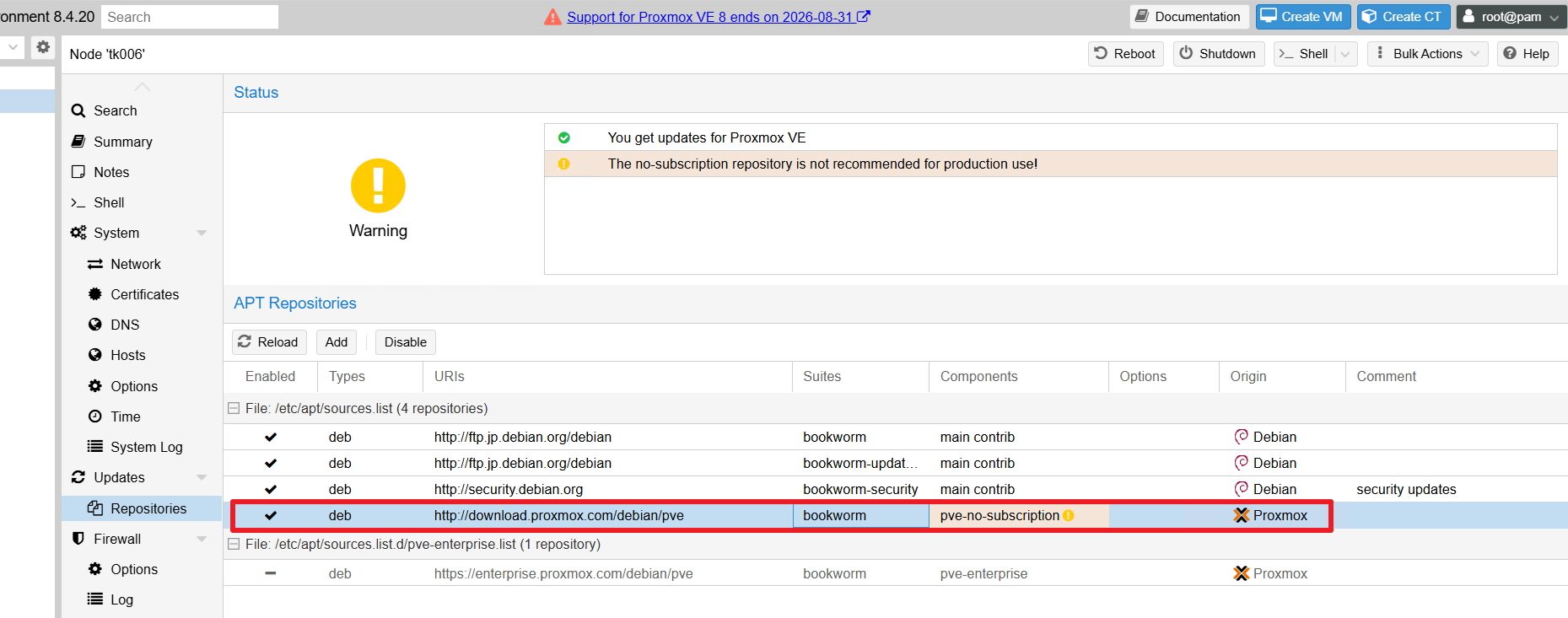
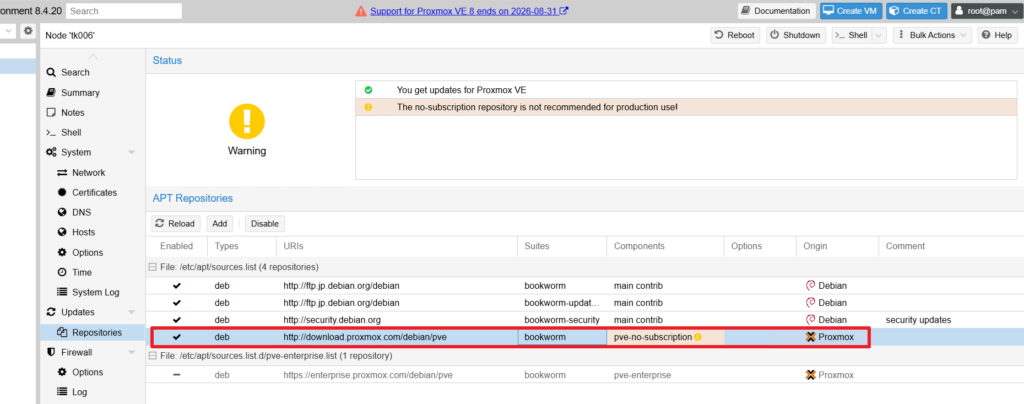
Updates > repositories > Add
No-Subscription を追加
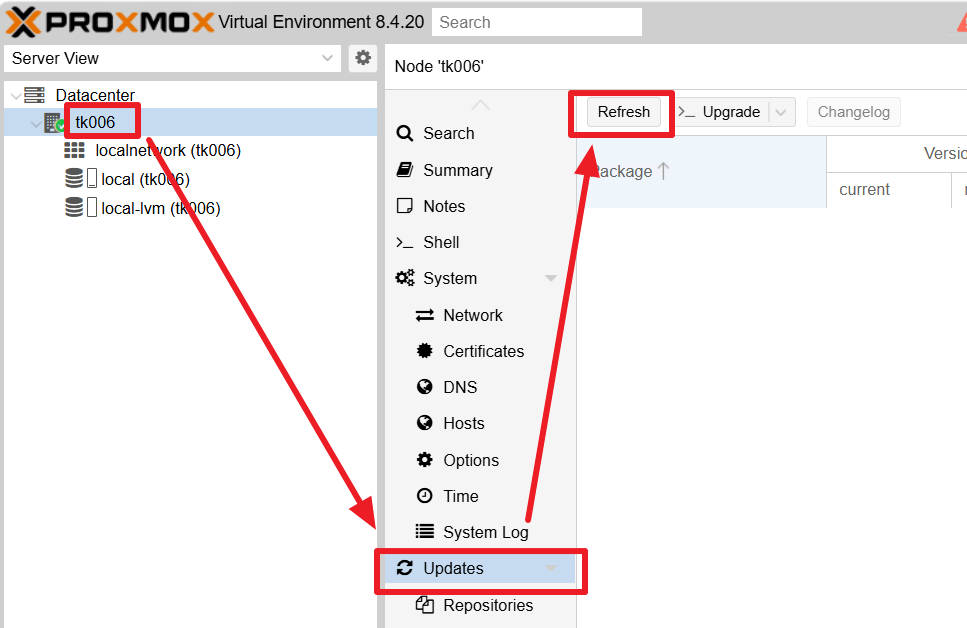
現在のバージョンの最新にする
次に現在のバージョン(ここではv7系)の最新にします。
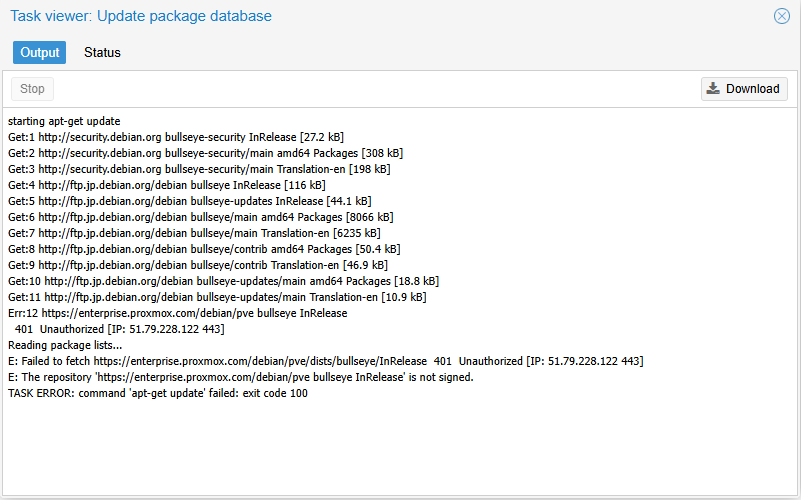
2. パッケージが更新されるので閉じる
Upgrade
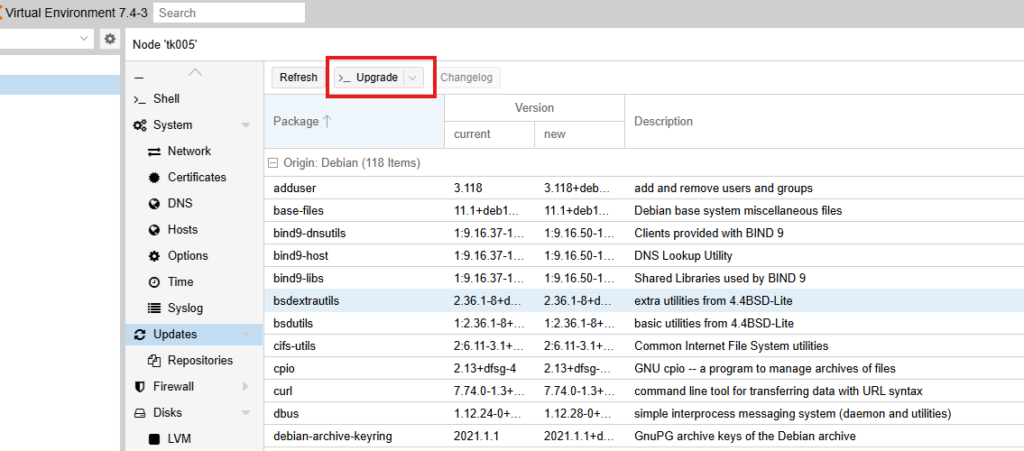
Y
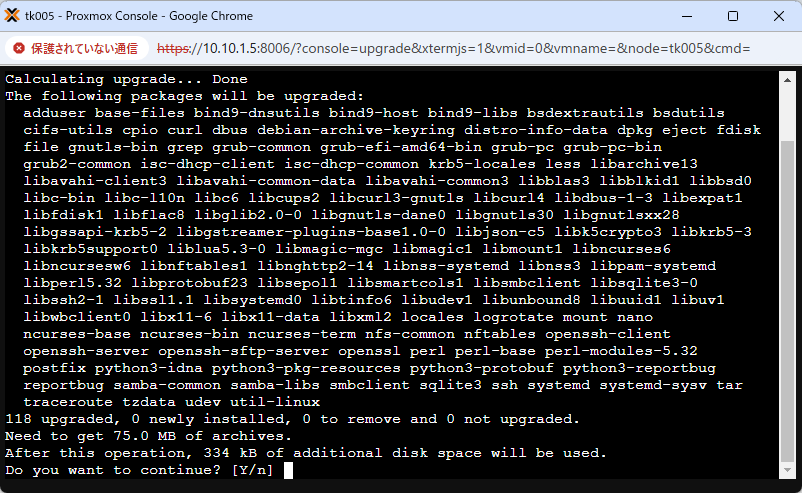
バージョンを確認
pveversion実行例:
root@tk006:~# pveversion
pve-manager/8.4.20/2cd51c80a4df7ee1 (running kernel: 5.15.102-1-pve)
アップグレード
1. アップグレードできるかチェック
以下のチェックコマンドを実行します。
pve8to9 --full実行例:
root@tk006:~# pve8to9 --full
= CHECKING VERSION INFORMATION FOR PVE PACKAGES =

Checking for package updates..
PASS: all packages up-to-date

Checking proxmox-ve package version..
PASS: proxmox-ve package has version >= 8.4-0

Checking running kernel version..
WARN: unexpected running and installed kernel '5.15.102-1-pve'.

= CHECKING CLUSTER HEALTH/SETTINGS =

SKIP: standalone node.

= CHECKING HYPER-CONVERGED CEPH STATUS =

SKIP: no hyper-converged ceph setup detected!

= CHECKING CONFIGURED STORAGES =

PASS: storage 'local' enabled and active.
PASS: storage 'local-lvm' enabled and active.
INFO: Checking storage content type configuration..
PASS: no storage content problems found
PASS: no storage re-uses a directory for multiple content types.
INFO: Check for usage of native GlusterFS storage plugin...
PASS: No GlusterFS storage found.
INFO: Checking whether all external RBD storages have the 'keyring' option configured
SKIP: No RBD storage configured.

= VIRTUAL GUEST CHECKS =

INFO: Checking for running guests..
PASS: no running guest detected.
INFO: Checking if LXCFS is running with FUSE3 library, if already upgraded..
SKIP: not yet upgraded, no need to check the FUSE library version LXCFS uses
INFO: Checking for VirtIO devices that would change their MTU...
PASS: All guest config descriptions fit in the new limit of 8 KiB
INFO: Checking container configs for deprecated lxc.cgroup entries
PASS: No legacy 'lxc.cgroup' keys found.
INFO: Checking VM configurations for outdated machine versions
PASS: All VM machine versions are recent enough

= MISCELLANEOUS CHECKS =

INFO: Checking common daemon services..
PASS: systemd unit 'pveproxy.service' is in state 'active'
PASS: systemd unit 'pvedaemon.service' is in state 'active'
PASS: systemd unit 'pvescheduler.service' is in state 'active'
PASS: systemd unit 'pvestatd.service' is in state 'active'
INFO: Checking for supported & active NTP service..
PASS: Detected active time synchronisation unit 'chrony.service'
INFO: Checking if the local node's hostname 'tk006' is resolvable..
INFO: Checking if resolved IP is configured on local node..
PASS: Resolved node IP '10.10.1.6' configured and active on single interface.
INFO: Check node certificate's RSA key size
PASS: Certificate 'pve-root-ca.pem' passed Debian Busters (and newer) security level for TLS connections (4096 >= 2048 RSA)
PASS: Certificate 'pve-ssl.pem' passed Debian Busters (and newer) security level for TLS connections (2048 >= 2048 RSA)
INFO: Checking backup retention settings..
PASS: no backup retention problems found.
INFO: checking CIFS credential location..
PASS: no CIFS credentials at outdated location found.
INFO: Checking permission system changes..
INFO: Checking custom role IDs
PASS: no custom roles defined
INFO: Checking node and guest description/note length..
PASS: All node config descriptions fit in the new limit of 64 KiB
INFO: Checking if the suite for the Debian security repository is correct..
PASS: found no suite mismatch
INFO: Checking for existence of NVIDIA vGPU Manager..
PASS: No NVIDIA vGPU Service found.
INFO: Checking bootloader configuration...
WARN: System booted in uefi mode but grub-efi-amd64 meta-package not installed, new grub versions will not be installed to /boot/efi! Install grub-efi-amd64.
WARN: Removable bootloader found at '/boot/efi/EFI/BOOT/BOOTX64.efi', but GRUB packages not set up to update it!
Run the following command:
echo 'grub-efi-amd64 grub2/force_efi_extra_removable boolean true' | debconf-set-selections -v -u
Then reinstall GRUB with 'apt install --reinstall grub-efi-amd64'
INFO: Check for dkms modules...
SKIP: could not get dkms status
INFO: Check for legacy 'filter' or 'group' sections in /etc/pve/notifications.cfg...
INFO: Check for legacy 'notification-policy' or 'notification-target' options in /etc/pve/jobs.cfg...
PASS: No legacy 'notification-policy' or 'notification-target' options found!
INFO: Check for LVM autoactivation settings on LVM and LVM-thin storages...
PASS: all guest volumes on storage 'local-lvm' have autoactivation disabled
PASS: No problematic volumes found.
INFO: Checking lvm config for thin_check_options...
PASS: Check for correct thin_check_options passed
INFO: Check space requirements for RRD migration...
du: cannot access '/var/lib/rrdcached/db/pve2-vm': No such file or directory
PASS: Enough free disk space for increased RRD metric granularity requirements, which is roughly 1.87 MiB.
INFO: Checking for IPAM DB files that have not yet been migrated.
PASS: No legacy IPAM DB found.
PASS: No legacy MAC DB found.
INFO: Checking if the legacy sysctl file '/etc/sysctl.conf' needs to be migrated to new '/etc/sysctl.d/' path.
PASS: Legacy file '/etc/sysctl.conf' exists but does not contain any settings.
INFO: Checking if matching CPU microcode package is installed.
WARN: The matching CPU microcode package 'amd64-microcode' could not be found! Consider installing it to receive the latest security and bug fixes for your CPU.
        Ensure you enable the 'non-free-firmware' component in the apt sources and run:
        apt install amd64-microcode
SKIP: No containers on node detected.

= SUMMARY =

TOTAL:    43
PASSED:   33
SKIPPED:  6
WARNINGS: 4
FAILURES: 0

ATTENTION: Please check the output for detailed information!
root@tk006:~#
全てPASSED、SKIPPEDになっていればOK
WARNINGSも無視してよい
ただ、ここでは今後のためにWARNINGに対処します。
2. WARNING対処
■ WARN 1: 実行中カーネルが古い (WARN: unexpected running and installed kernel ‘5.15.102-1-pve’.)
→ これは無視します
■ WARN 2 & 3: ブートローダー (GRUB EFI) の設定
UEFIモードで起動しているのに grub-efi-amd64 メタパッケージがインストールされていないことが問題のようです。以下のコマンドを実行してパッケージをインストールします。
# デフォルトだとgrub-efi-amd64パッケージが無いため、non-free-firmwareをsource.listに追加する
# 参考:https://forum.proxmox.com/threads/8-to-9-amd64-microcode-warning.169263/
echo 'grub-efi-amd64 grub2/force_efi_extra_removable boolean true' | debconf-set-selections -v -u
# インストール
apt install --reinstall grub-efi-amd64
実行例:
root@tk006:~# echo 'grub-efi-amd64 grub2/force_efi_extra_removable boolean true' | debconf-set-selections -v -u
apt install --reinstall grub-efi-amd64
info: Trying to set 'grub2/force_efi_extra_removable' [boolean] to 'true'
info: Loading answer for 'grub2/force_efi_extra_removable'
Reading package lists... Done
Building dependency tree... Done
Reading state information... Done
The following package was automatically installed and is no longer required:
  telnet
Use 'apt autoremove' to remove it.
The following packages will be REMOVED:
  grub-pc
The following NEW packages will be installed:
  grub-efi-amd64
0 upgraded, 1 newly installed, 1 to remove and 0 not upgraded.
Need to get 45.7 kB of archives.
After this operation, 384 kB disk space will be freed.
Do you want to continue? [Y/n] y
Get:1 http://download.proxmox.com/debian/pve bookworm/pve-no-subscription amd64 grub-efi-amd64 amd64 2.06-13+pmx7 [45.7 kB]
Fetched 45.7 kB in 8s (5,875 B/s)
Preconfiguring packages ...
(Reading database ... 64098 files and directories currently installed.)
Removing grub-pc (2.06-13+pmx7) ...
Selecting previously unselected package grub-efi-amd64.
(Reading database ... 64090 files and directories currently installed.)
Preparing to unpack .../grub-efi-amd64_2.06-13+pmx7_amd64.deb ...
Unpacking grub-efi-amd64 (2.06-13+pmx7) ...
Setting up grub-efi-amd64 (2.06-13+pmx7) ...
Installing for x86_64-efi platform.
File descriptor 3 (pipe:[4253938]) leaked on vgs invocation. Parent PID 924761: grub-install.real
File descriptor 3 (pipe:[4253938]) leaked on vgs invocation. Parent PID 924761: grub-install.real
Installation finished. No error reported.
Generating grub configuration file ...
Found linux image: /boot/vmlinuz-6.8.12-41-pve
Found initrd image: /boot/initrd.img-6.8.12-41-pve
Found linux image: /boot/vmlinuz-5.15.158-2-pve
Found initrd image: /boot/initrd.img-5.15.158-2-pve
Found linux image: /boot/vmlinuz-5.15.102-1-pve
Found initrd image: /boot/initrd.img-5.15.102-1-pve
Found memtest86+ 64bit EFI image: /boot/memtest86+x64.efi
Adding boot menu entry for UEFI Firmware Settings ...
done
Processing triggers for man-db (2.11.2-2) ...
■ WARN 4: CPUマイクロコードが未インストール
AMD CPU用のマイクロコード更新パッケージがインストールされていないようです。以下のコマンドを実行して追加インストールします。
sed -i.bak -E '/proxmox/!{/^deb .*bookworm/{/non-free-firmware/!s/$/ non-free-firmware/}}' /etc/apt/sources.list
apt install amd64-microcode
root@tk006:~# cat /etc/apt/sources.list
deb http://ftp.jp.debian.org/debian bookworm main contrib
deb http://ftp.jp.debian.org/debian bookworm-updates main contrib
# security updates
deb http://security.debian.org bookworm-security main contrib
deb http://download.proxmox.com/debian/pve bookworm pve-no-subscription
root@tk006:~# sed -i.bak -E '/proxmox/!{/^deb .*bookworm/{/non-free-firmware/!s/$/ non-free-firmware/}}' /etc/apt/sources.list
root@tk006:~#
root@tk006:~# cat /etc/apt/sources.list
deb http://ftp.jp.debian.org/debian bookworm main contrib non-free-firmware
deb http://ftp.jp.debian.org/debian bookworm-updates main contrib non-free-firmware
# security updates
deb http://security.debian.org bookworm-security main contrib non-free-firmware
deb http://download.proxmox.com/debian/pve bookworm pve-no-subscription
root@tk006:~# もう一度pve8to9 を実行して動作確認します。
pve8to9 --fullWARNINGが1つであればOK
= SUMMARY =

TOTAL:    42
PASSED:   35
SKIPPED:  6
WARNINGS: 1
FAILURES: 0

ATTENTION: Please check the output for detailed information!
2. リポジトリを変更
リポジトリをbookworm(debian12)からtrixie(debian13)に書き換える
sed -i 's/bookworm/trixie/g' /etc/apt/sources.list実行例:
root@tk005:~# cat /etc/apt/sources.list
deb http://ftp.jp.debian.org/debian bookworm main contrib non-free-firmware

deb http://ftp.jp.debian.org/debian bookworm-updates main contrib non-free-firmware

# security updates
deb http://security.debian.org bookworm-security main contrib non-free-firmware

deb http://download.proxmox.com/debian/pve bookworm pve-no-subscription

root@tk005:~#
root@tk005:~# sed -i 's/bookworm/trixie/g' /etc/apt/sources.list
root@tk005:~# cat /etc/apt/sources.list
deb http://ftp.jp.debian.org/debian trixie main contrib non-free-firmware

deb http://ftp.jp.debian.org/debian trixie-updates main contrib non-free-firmware

# security updates
deb http://security.debian.org trixie-security main contrib non-free-firmware

deb http://download.proxmox.com/debian/pve trixie pve-no-subscription

root@tk005:~#
公式手順にはEnterprise Subscriptionの追加があるが、無償版の場合は行わない
3. 更新
apt update
apt dist-upgrade
インストールシーケンスと、様々な確認がはじまる。
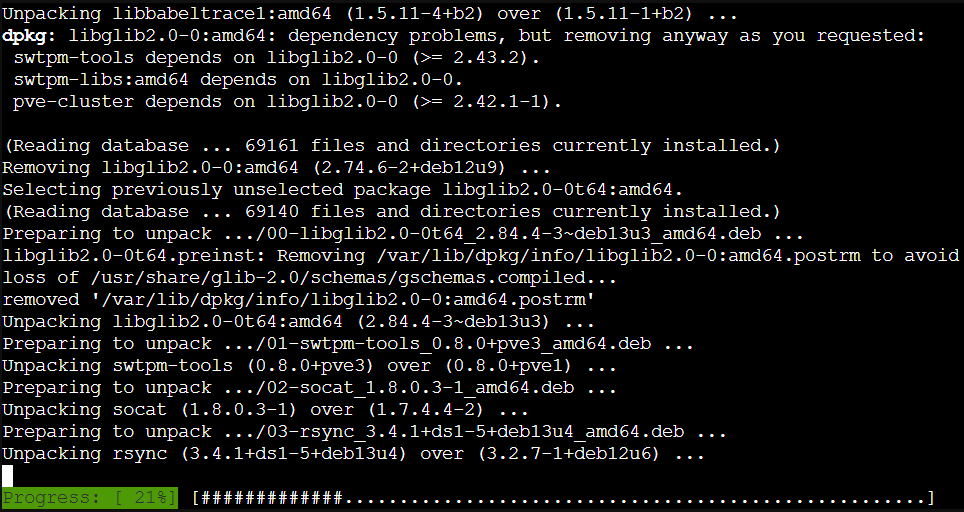
4. 各種確認
ここが一番厄介で、公式によると様々な質問が発生するケースがあるらしい。
私の場合は以下の通り設定しました。
issue → N
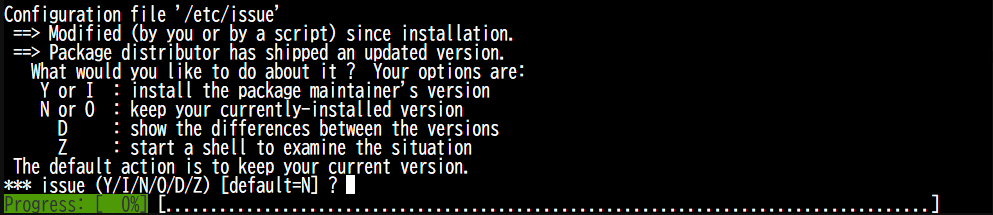
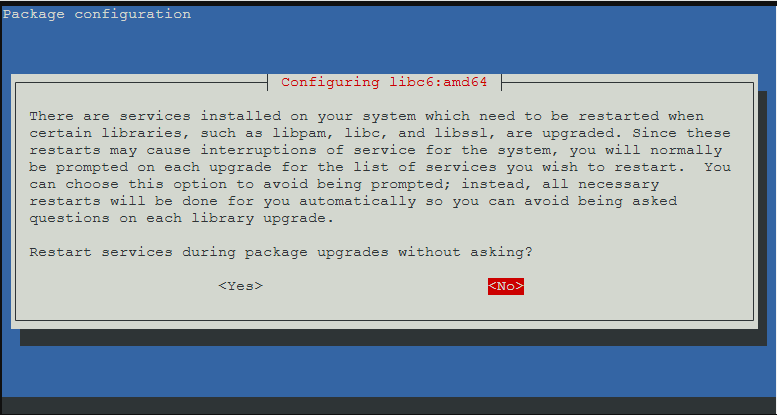
libc6 → No
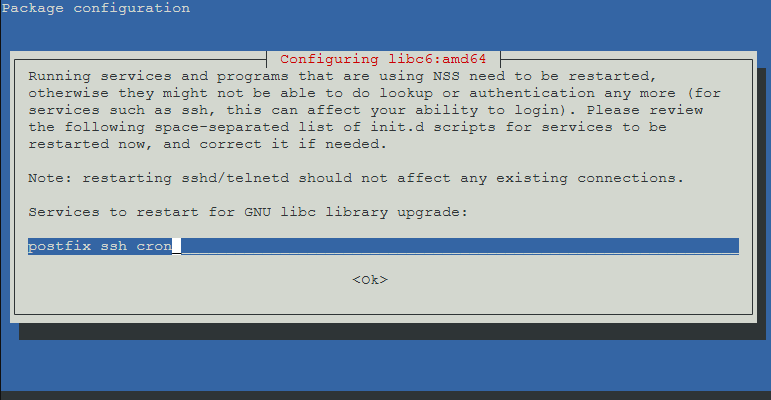
libc6 path → OK
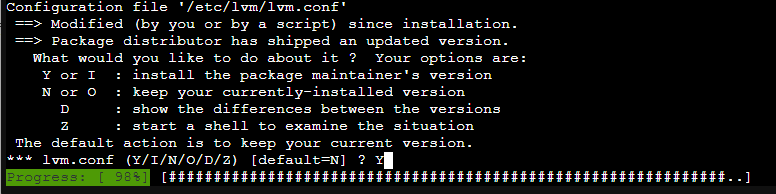
lvm.conf → Y
他参考:
/etc/issue: defaultのNを選択/etc/lvm/lvm.conf: LVMに関して特別な変更をしていないので上書きのYを選択/etc/ssh/sshd_config: 問い合わせが現れませんでした/etc/default/grub: 新旧の差分を表示して確認したあと、上書きで問題ないと判断してYを選択/etc/apt/sources.list.d/pve-enterprise.list: 上書きのYを選択 (No-Subscription向けリポジトリへの変更は後ほどPVEのGUIでも行えるため)
5. バージョン確認
root@tk006:~# pveversion
pve-manager/9.2.10/43df2e01f27a1a19 (running kernel: 5.15.102-1-pve)
以上!
コメント